DK11 Game APK Download Latest Version 2026 – Complete Guide for Pakistan
Description
What Is DK11 Game and How Does It Work?
DK11 Game is an online gaming application that attracts users looking for mobile-based gaming and account features. The DK11 Game APK is designed for Android installation, allowing users to access its available sections through a mobile device. Pakistani users searching for this application often want details about downloading, registration, login and payment options before getting started. This guide explains its main information, installation process and important precautions.

Introduction to DK11 Game Pakistan
DK11 Game is associated with online gaming searches in Pakistan. Its audience may include Android users interested in exploring different gaming categories and account services. The application also lists payment options relevant to Pakistani users, including Easypaisa, JazzCash and cryptocurrency.
How the DK11 Gaming Platform Works
The general process involves downloading the application, installing it on a compatible Android phone and creating an account if registration is required. After accessing the application, users can explore the available sections and account options.
Why DK11 Game Is Getting Attention in Pakistan
Searches for DK11 Game Pakistan are related to APK downloads, mobile gaming features and local payment facilities. Users also want straightforward information about app size, version updates and account requirements.
Who Can Use the DK11 Android App?
Android users should check the application’s system requirements and regional eligibility before installation. Anyone considering real-money gaming should understand the possible financial risks and applicable terms.
DK11 Game APK – App Information and Technical Details
Before downloading DK11 Game APK, users should check its version, file size and device compatibility. These details help identify the intended installation package and avoid confusion with older or modified files.
DK11 Game App Overview
DK11 Game is presented as a mobile gaming platform with account-related functions and different gaming options. Its available services should always be checked against the actual installed application.
Latest APK Version and File Size
The supplied DK11 application information identifies version 2.58.1 with a download size of 9.9 MB. Users should compare these details with the file provided by their intended download source before installation.
| App Information | Details |
|---|---|
| App Name | DK11 Game |
| APK Version | 2.58.1 |
| APK File Size | 9.9 MB |
| App Category | Online Gaming |
| Platform | Android |
| Payment Methods | Easypaisa, JazzCash, Cryptocurrency |
| Target Audience | Pakistani Users |
| Compatibility | Check Android requirements |
Android Compatibility and System Requirements
The application should be installed only on a compatible Android device. Check the minimum Android version, available storage and other requirements provided by the publisher.
Developer and App Category
Check the developer or publisher information before downloading. A genuine distribution source should provide consistent app details and identifiable support information.
Latest Update Information for 2026
Version 2.58.1 is the version information supplied for this DK11 article. Users should check the publisher’s latest release information to confirm whether a newer version has become available.
Is DK11 Available on Google Play Store?
Do not assume that DK11 is listed on Google Play. Search for the exact application name and publisher. If it is distributed through an APK source, carefully review the file and its origin before installation.
Main Features of DK11 Game
Features help users understand what an application offers and how its different sections may be organised. The actual availability of each feature should be checked inside DK11 version 2.58.1.
User-Friendly Interface and Easy Navigation
A clear interface can make it easier to locate gaming categories, account settings and other available options. Users should explore the menus to understand how the application is organised.
Multiple Gaming Categories and Options
The platform may present different gaming categories within its interface. Check the current version to identify which options are actually available.
HD Graphics and Gaming Performance
Visual quality and performance depend on the application design and the Android device. A stable internet connection and sufficient device resources can also affect the experience.
Account Management and Quick Sign-In
Account-related options may include registration, login and profile management. Keep account credentials private and use only the official access procedure.
Daily Activities and Reward Options
If daily activities or rewards are available, review their conditions and eligibility requirements before participating.
Multiplayer Features and Live Gaming Modes
Some online gaming platforms advertise multiplayer and live options. Check the installed application to determine whether these features are available.
Tournaments, Events and Special Activities
Special activities may have separate participation rules and deadlines. Review the conditions before joining any event.
Referral Program and Invite Options
If a referral facility is available, check how invitation links or codes work and whether rewards have specific qualifying conditions.
VIP Membership and Lucky Draw Features
VIP memberships and lucky draw options should be treated as promotional features that require careful review of their rules and possible costs.
Customer Support and Help Services
Check the available help section and verified contact details. This is especially useful when dealing with account access or transaction problems.
Language Support and Accessibility
Review the language options and menu readability to understand whether the application is convenient to use on your device.
Games and Categories Available on DK11
Gaming categories can differ between application versions. Users should explore DK11 Game directly rather than relying entirely on promotional descriptions.
Popular Game Categories
Check the main menu to identify the categories displayed in the installed version.
Card and Table Games
If card or table games are available, read their rules and understand the participation requirements before starting.
Arcade and Casual Games
Arcade-style games generally focus on shorter sessions and simple controls. Check the actual selection within the application.
Live and Multiplayer Gaming Options
Live and multiplayer sections may require a stable internet connection. Their availability should be confirmed through the current app interface.
Trending Games Among Pakistani Users
Search popularity does not necessarily prove that a particular game is widely used. Compare the available options and independent feedback before making a choice.
How to Explore Different Game Sections
Open the main menu, review the category names and read the instructions associated with each section.
DK11 Game Download for Android, iOS and PC
People searching for DK11 Game Download generally want a simple way to obtain and install the application. Before downloading version 2.58.1, check the 9.9 MB file size and verify that the installation package comes from a trustworthy source.
Where to Find the DK11 APK File
Use a distribution source that identifies the application and publisher clearly. Avoid modified APKs, unknown download buttons and suspicious links.
How to Download DK11 Game on Android
- Find a source that you can independently verify.
- Locate the DK11 Game APK download option.
- Check that the displayed version is 2.58.1.
- Compare the listed file size with 9.9 MB.
- Download the installation file.
- Review the file before opening it.
How to Install DK11 APK on Android
After downloading the APK, open your phone’s Downloads folder and locate the file.
Review the file source and Android security information before proceeding. Follow the device’s installation instructions and check the application’s permissions after installation.
Android Unknown App Installation Permissions
Android may request permission to install an application from an external source. Allow this only when you have independently checked the source. Disable unnecessary installation permissions afterward.
How to Access DK11 on PC
PC access depends on whether the publisher offers an official desktop or web version. An Android APK does not automatically work on Windows. Check compatibility before using an emulator.
DK11 Availability for iPhone and iOS Users
Android APK files cannot be installed directly on an iPhone. iOS users should check whether the publisher provides an official iOS application or supported website.
Important Checks Before Installing the APK
Check the publisher details, version number, file size, device compatibility and requested permissions. A security scan can help identify some threats, but it cannot guarantee complete safety.
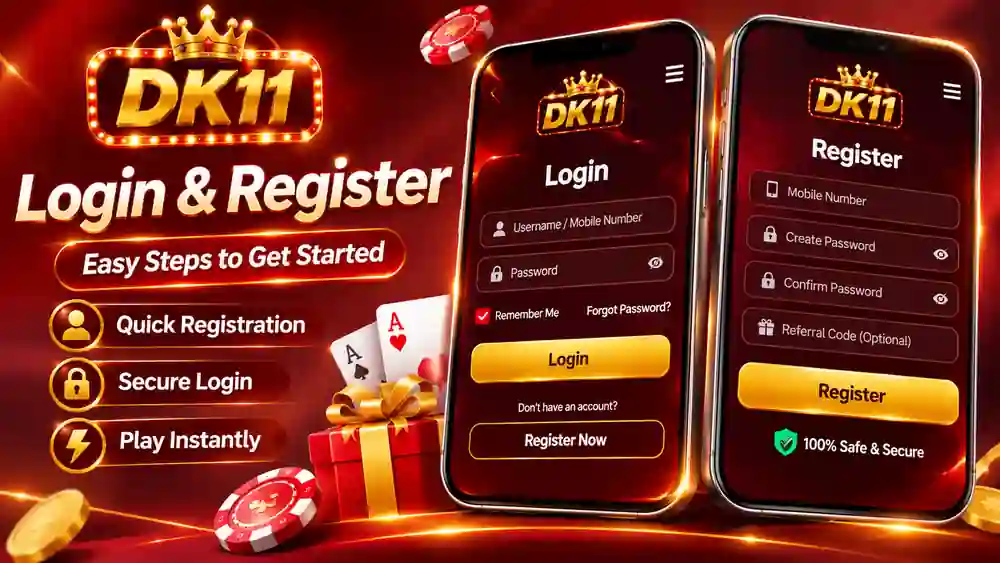
How to Register a New Account on DK11 Game
Registration requirements depend on the platform’s current account system. Before creating an account, review its privacy policy and eligibility conditions.
Opening the DK11 Registration Page
Open the application and locate the registration option if available. Read the instructions before entering any information.
Entering Your Mobile Number and Required Details
Provide only the information required by the registration process. Make sure you understand how the platform handles personal details.
OTP and Account Verification
If mobile verification is supported, enter the OTP received through the registered channel. Never share verification codes with other people.
Creating a Secure Login Password
Choose a strong and unique password. Avoid using the same password as your email, banking or mobile wallet account.
Important Account Registration Tips
Use accurate information, follow the eligibility rules and avoid creating multiple accounts to bypass platform restrictions.
DK11 Game Login Guide for Existing Users
Existing users can use the login facility to access their accounts and available services.
How to Access Your DK11 Account
Open the genuine application and find the login option.
Login Using Registered Account Details
Enter your registered details and check for typing errors before submitting them.
Password Recovery and Reset Process
If password recovery is available, follow the official verification instructions. Never provide your account password or OTP to unofficial support contacts.
What to Do If DK11 Login Is Not Working?
Check your internet connection, registered details and application version. If the problem continues, use a verified support channel.
Exploring DK11 Account Dashboard and Settings
The dashboard can help users understand their account information and navigate the available application sections.
Understanding the Main Dashboard
Review the visible menu items and account options. Feature availability may differ between accounts.
User Profile and Account Information
Check the information displayed in your profile and avoid sharing screenshots containing private details.
Account Security and Password Settings
Use a unique password and enable additional verification if a trustworthy security option is available.
Transaction and Activity History
If transaction history is provided, use it to review account activity and identify unexpected changes.
Help and Customer Support Options
Locate the application’s help section and keep transaction references when requesting assistance.
DK11 Game Bonuses, Rewards and Referral Program
Some gaming applications advertise welcome offers, referral rewards and other promotional activities. Their actual availability should be checked in DK11 version 2.58.1.
Welcome Bonus and New User Promotions
Check whether a welcome promotion is available and review its eligibility conditions. A promotional balance should not automatically be treated as withdrawable money.
Daily Login Rewards and Activity Bonuses
Daily rewards may have specific participation rules or expiry dates. Read the terms before claiming an offer.
Spin Wheel and Lucky Draw Options
If these features are available, check whether participation is free or involves a payment or wager.
Referral Program and Invite Rewards
Review the referral conditions, qualifying activities and eligibility requirements before sharing an invitation link.
VIP Club and Membership Benefits
Check whether VIP membership involves deposits or additional commitments. Understand its terms before joining.
Promotional Offers and Bonus Conditions
Offers may include wagering requirements, restrictions or withdrawal conditions. Read all applicable rules carefully.
Important Terms Before Claiming a Bonus
Do not deposit money only because an advertisement promises a reward. Consider the financial risk and review the complete terms.
DK11 Game Payment Methods in Pakistan
Payment facilities are an important consideration for Pakistani users. According to the supplied DK11 application information, three payment options are included: Easypaisa (EP), JazzCash and cryptocurrency.
JazzCash Payment Method
JazzCash is one of the listed payment options for DK11 Game. Users should check the payment instructions displayed in the application before initiating a transaction.
Verify the recipient information and transaction amount. Keep the receipt for future reference.
Easypaisa (EP) Payment Method
Easypaisa, also known as EP, is another listed payment method. Pakistani users should review the available instructions and applicable conditions before making a payment.
Do not send money to an unverified personal number or account.
Cryptocurrency Payment Method
Cryptocurrency is also included among the supplied DK11 payment options. Before using this method, check the supported cryptocurrency, wallet address and network information.
A transaction sent to an incorrect address or incompatible network may be difficult or impossible to recover. Cryptocurrency values can also change, creating additional financial risks.
Other Available Payment Methods
The three methods identified for this article are Easypaisa, JazzCash and cryptocurrency. Do not assume that additional options are supported unless they appear in the current application.
How to Check Supported Payment Options
Open the payment section and review the available methods, transaction instructions and applicable conditions. Confirm the details before sending funds.
DK11 Game Deposit and Withdrawal Guide
Users should understand the deposit and withdrawal conditions before making any financial transaction. Requirements can vary according to the platform’s current policies.
How to Review Deposit Instructions
Read the payment instructions carefully and verify the recipient information. Check whether your selected method is supported.
Step-by-Step Deposit Process
If deposits are available, follow the instructions displayed in the application. Confirm the amount, recipient and payment method before completing the transaction.
Minimum Deposit Requirements
Check the minimum deposit displayed in the current payment section. Do not depend on outdated figures from third-party websites.
How to Submit a Withdrawal Request
If withdrawal functionality is available, review your account requirements and follow the official request procedure.
Minimum Withdrawal Requirements
The minimum withdrawal amount should be confirmed through the current platform terms. It may change over time.
Withdrawal Processing Time
Processing time depends on the platform’s policies and payment provider. Do not assume that every transaction will be completed instantly.
Common Reasons for Transaction Delays
Possible reasons include incomplete verification, incorrect payment information, processing issues or account restrictions.
What to Do When a Withdrawal Is Pending?
Keep the transaction reference, check the request status and contact verified support. Do not repeat a payment until the previous transaction has been resolved.
DK11 Game Advantages and Disadvantages
Understanding both advantages and limitations can help users make an informed decision.
Main Advantages of DK11 Game
Potential benefits, where supported by the actual application, include:
- Android-based mobile access.
- A central account dashboard.
- Multiple gaming categories.
- Three listed payment options.
- Account and transaction information.
- Access to available support services.
Possible Limitations and Disadvantages
Users should consider the following concerns:
- APK source verification requirements.
- Limited transparency about the publisher.
- Device compatibility restrictions.
- Possible promotional conditions.
- Transaction delays or account restrictions.
- Financial risks associated with real-money gaming.
Important Things to Consider Before Using the App
Review the privacy policy, payment terms and eligibility requirements. Never treat online gaming as a guaranteed source of income.
DK11 Game Safety, Privacy and Security Review
Safety should be considered before installing any third-party application. A small APK file or attractive promotional offer does not automatically make an application trustworthy.
Is DK11 Game Safe to Install?
Safety cannot be confirmed simply by viewing an APK listing. Check the source, publisher, app permissions and independent security information.
How to Verify the APK Download Source
Download only from a source that you can independently verify. Avoid modified APKs and suspicious links.
Understanding App Permissions
Review every permission requested by the application. Be careful if a gaming app requests access that does not appear necessary for its normal operation.
Protecting Personal and Account Information
Use a unique password and keep verification codes private. Never share banking credentials, wallet PINs or sensitive personal details.
Payment Security and Transaction Precautions
Whether using Easypaisa, JazzCash or cryptocurrency, verify recipient details before making a payment. Keep transaction records and contact the relevant provider if you notice an unauthorised transaction.
Responsible Gaming and Financial Risk Awareness
Games involving money can result in financial losses. Set strict limits, never borrow money to participate and do not consider rewards guaranteed income. Take a break if gaming becomes difficult to control.
Common DK11 Game Problems and Their Solutions
Technical problems can occur because of device compatibility, internet connectivity or application errors. These checks may help users identify common issues.
DK11 APK Not Downloading
Check your internet connection, available storage and download source. Avoid repeatedly downloading files from suspicious websites.
DK11 Game Not Installing on Android
Check Android compatibility, available storage and file integrity. The expected DK11 APK size is 9.9 MB, but confirm the actual download against the publisher’s information.
DK11 App Not Opening or Crashing
Restart your phone, check available storage and look for an authentic application update. Avoid installing unofficial modified versions.
DK11 Login and OTP Verification Problems
Check your registered details, network connection and OTP delivery. Use only the official account recovery procedure.
Deposit Not Showing in Account
Check your payment receipt and transaction reference. Contact verified support and do not repeat the payment until the original issue is resolved.
Withdrawal Request Taking Too Long
Review the processing conditions and verify your account status. Keep the request reference for follow-up.
How to Contact DK11 Customer Support
Use contact information published by the verified platform. Do not share passwords, OTP codes or wallet PINs with anyone claiming to provide technical assistance.
DK11 Game User Experience and Overall Review
An independent review should focus on actual application behaviour instead of repeating promotional statements.
Interface and Navigation Experience
A useful gaming application should make its main sections understandable and easy to access. Check whether the menus and account controls work properly.
App Performance on Android Devices
Performance can vary according to device specifications, Android version and network conditions. Test the application before relying on its services.
Available Features and Account Options
Compare the advertised features with those actually present in version 2.58.1. Do not assume that every promotional feature is available.
Important Limitations for Pakistani Users
Pakistani users should check regional eligibility, payment availability, customer support and applicable legal requirements.
Is DK11 Suitable for Every Android User?
Not necessarily. Suitability depends on device compatibility, privacy requirements, platform transparency and the user’s understanding of financial risks.
Frequently Asked Questions About DK11 Game
What Is DK11 Game APK?
DK11 Game APK is the Android installation package associated with the DK11 gaming application. Users should verify its source and publisher before installation.
What Is the Latest DK11 APK Version?
The version information supplied for this guide is 2.58.1. Check the publisher’s current release information to confirm whether a newer version is available.
What Is the DK11 Game APK File Size?
The supplied APK file size is 9.9 MB. Compare the downloaded file with the information provided by the intended publisher.
How Can I Download DK11 Game in Pakistan?
Find a verifiable source, check the version and file size, then download the correct Android package. Review its security before installation.
Is DK11 Game Available on Google Play Store?
Search Google Play using the exact app name and publisher. Do not assume availability without finding the genuine listing.
Can I Install DK11 Game on an iPhone?
Android APK files cannot be installed directly on iPhones. Check whether the publisher provides an official iOS application or supported website.
Can I Play DK11 Game on a PC?
PC access depends on whether the publisher offers an official desktop or web version. Android emulator compatibility should not be assumed.
How Do I Register a DK11 Account?
If registration is available, follow the application’s sign-up instructions and complete any required verification.
What Should I Do If I Forget My DK11 Password?
Use the official password recovery option if provided. Never share your OTP or account password with another person.
Does DK11 Support JazzCash and Easypaisa?
Yes. According to the supplied application information, DK11 includes JazzCash and Easypaisa (EP) payment options.
Does DK11 Support Cryptocurrency Payments?
Yes. Cryptocurrency is also listed as an available payment method. Check the supported currency and network details before making a transaction.
How Can I Check a Pending Withdrawal?
Review the transaction history and save the request reference. Contact verified support if the request remains unresolved.
Does DK11 Offer Referral Rewards?
Check the current application to determine whether a referral programme is available and review its conditions before participating.
Is DK11 Game Safe for Android Users?
Safety depends on the APK source, publisher transparency, permissions and security practices. Users should independently assess these factors before installation.
Final Verdict – Things to Know Before Using DK11 Game
DK11 Game APK version 2.58.1 has a supplied file size of 9.9 MB and lists Easypaisa, JazzCash and cryptocurrency among its payment options. These details make app information and payment methods important topics for Pakistani users researching the platform.
Before downloading, verify the installation source, check Android compatibility and review the application’s permissions. Understand account requirements, promotional conditions and transaction rules before using any financial feature.
A careful approach is more useful than relying on promotional claims. Protect your personal information, understand the risks of real-money gaming and use only services that you can independently verify.
Download links
How to install DK11 Game APK Download Latest Version 2026 – Complete Guide for Pakistan APK?
1. Tap the downloaded DK11 Game APK Download Latest Version 2026 – Complete Guide for Pakistan APK file.
2. Touch install.
3. Follow the steps on the screen.